.png)


Ready to Schedule
Drivers in Minutes?


It is 6:12 a.m. Two drivers just called in. One is sick, one is "running late" (which everyone knows means still asleep). You have 140 stops that need to be somewhere, a customer already texting "where's my order?", and a spreadsheet that made perfect sense last night and now looks like a ransom note.
If that scene made your stomach drop a little, this guide is for you. Scheduling delivery drivers looks simple from the outside. Just match people to routes, right? Then real life shows up. Traffic. Sick days. A neighborhood that eats 45 minutes for no reason. A driver who is brilliant but hates the north side.
Whether you are a business owner doing this between everything else, a dispatch or operations manager living inside it, a planning consultant fixing it for clients, or a driver just trying to understand why your day makes no sense, the goal is the same: a schedule that is fair, predictable, and does not quietly bleed money. Let's build one.
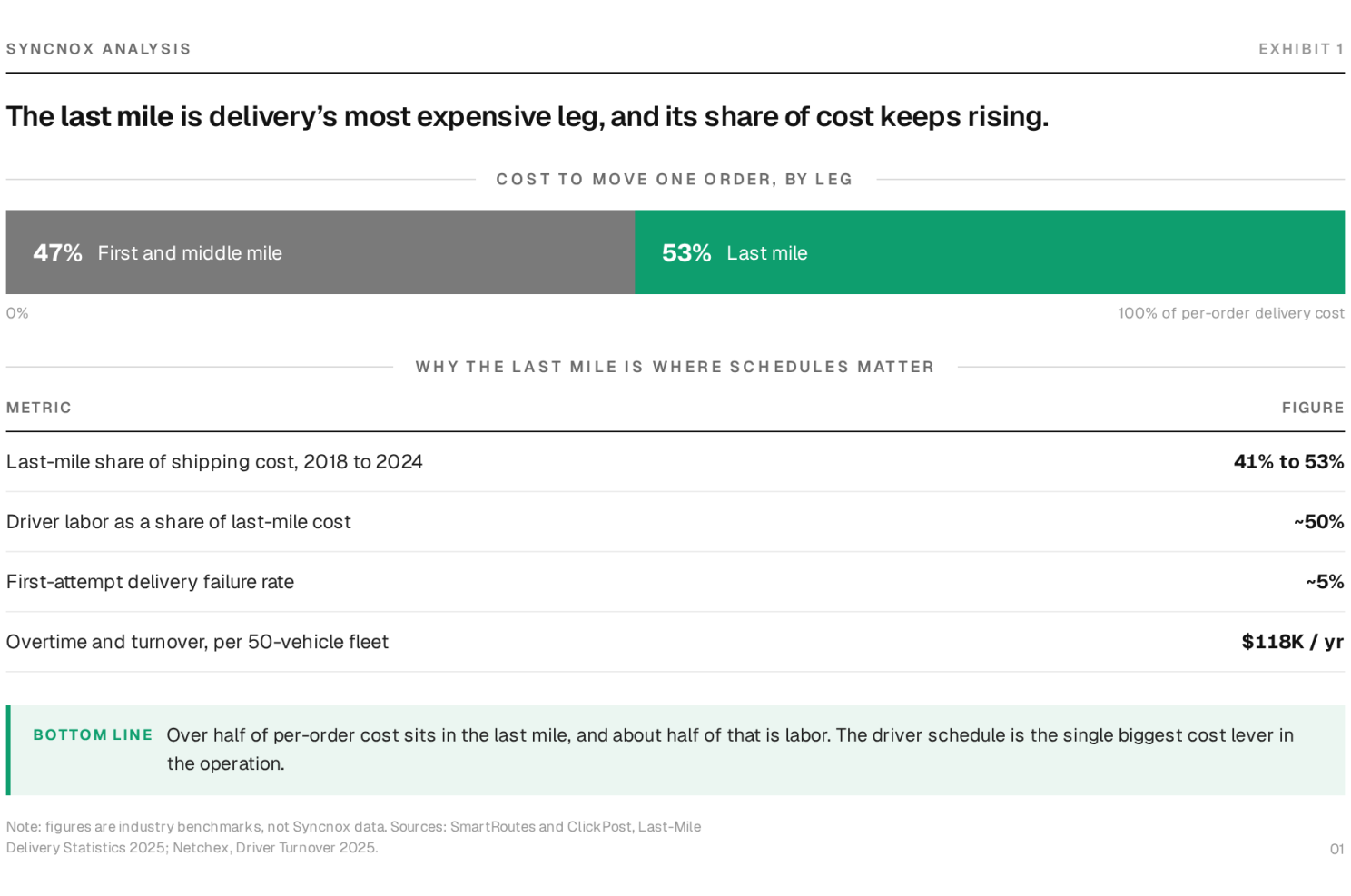
Here is the uncomfortable part most scheduling advice skips. The last mile is where your money goes to disappear. Last-mile delivery now accounts for roughly 53% of total shipping cost, up from about 41% in 2018. It is the single most expensive stretch of the whole supply chain, and labor sits right at the center of it.
A few numbers worth pinning to the wall. Labor is about half of last-mile cost, so every hour of overtime and every empty seat hits harder here than almost anywhere else. Roughly 5% of deliveries fail on the first try, at an average cost near $17.78 each; for a business doing 140,000 orders a year, that is close to $200,000 gone. And the country was short about 78,000 drivers in 2025, while replacing a single hourly driver runs $3,000 to $7,000 once you count hiring and training. Burning people out with bad schedules is expensive twice over.
The pain also scales. Once you cross about 500 deliveries a month, mid-day replans, hidden overtime, and a pile of "where's my order?" calls stop being occasional and become your Tuesday. When one driver gets 50 stops and another gets 20, the imbalance does not just cost money. It breeds resentment, and resentment is how you lose your best people.
Before the steps, get clear on the target. A schedule is not just a grid of names and times. A good one quietly does four jobs at once. It matches supply to demand, so you have enough drivers for the volume without a parking lot of idle vans. It balances the load fairly, so nobody is secretly doing two jobs while someone coasts. It bends without breaking, so one sick call does not collapse the day. And it respects the humans, with legal hours, real breaks, and preferences that keep people from quitting.
Hold those four in your head. Every step below is really about hitting all four at the same time.
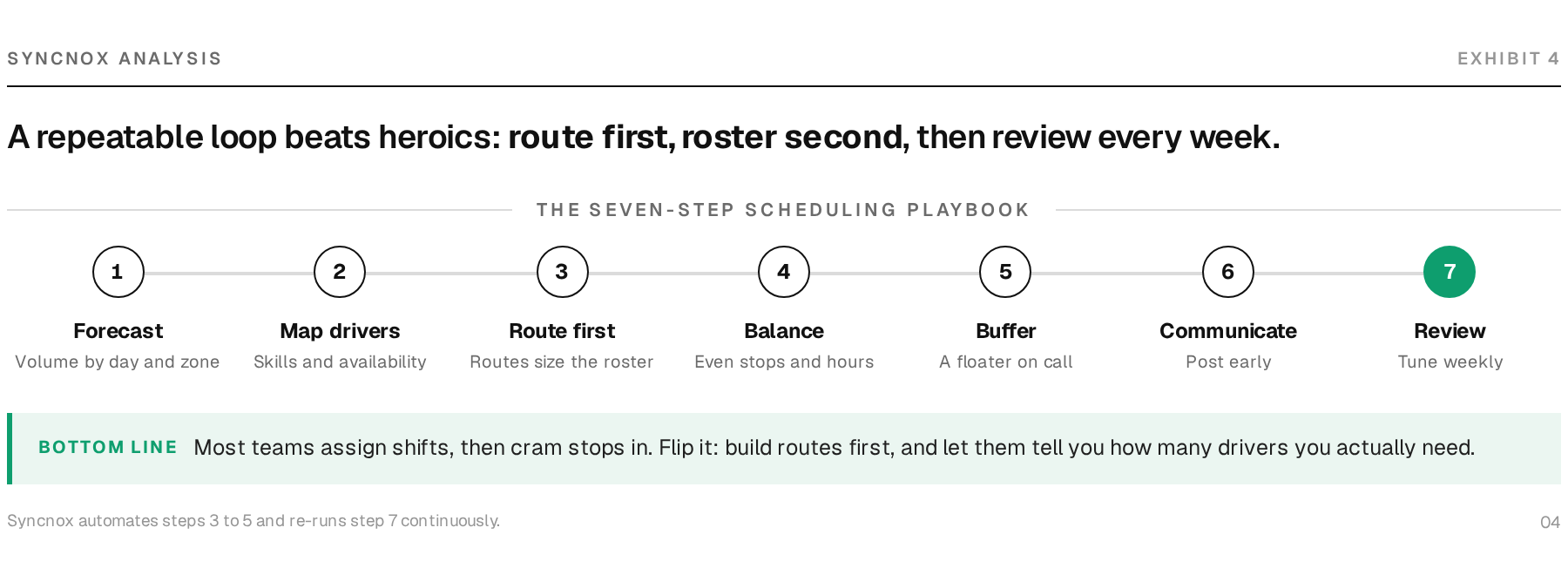
1. Forecast demand before you touch a single name. Start with the work, not the workers. Pull your last few weeks of order data and look for the shape of it: which days spike, which hours are dead, which zones are always heavy. Fridays and the days after a holiday are usually monsters. Ten minutes with real numbers beats an hour of guessing.
2. Know your drivers as people, not slots. Availability, licenses, vehicle type, home base, and yes, preferences. The driver who lives near the east side and actually likes those tight downtown streets is gold. A schedule that ignores this technically works, right up until people start ghosting their shifts.
3. Build routes first, then assign shifts to them. This is the step most people do backwards. They assign shifts, then cram stops into whatever is left. Flip it. Group your stops into sensible routes by zone, time window, and drive time, and let the routes tell you how many drivers and hours you actually need. Route first, roster second.
4. Balance the load like you will have to defend it out loud. Because you will. Nothing torches morale faster than a lopsided board. Aim for roughly even stops, miles, and hours. Quick gut-check: if you had to explain why Driver A's route is twice the size of Driver B's to the whole team, could you? If not, rebalance before Monday, not after the complaint.
5. Leave slack for the day going sideways. A schedule with zero buffer is not efficient, it is fragile. Keep a little breathing room: a floater, an on-call name, or simply not booking every driver to the redline. The sick call and the flat tire are not rare events. They are the job.
6. Communicate it clearly, and early. Post the schedule where everyone can see it, far enough ahead that people can plan their lives. Surprise schedules are a top reason drivers walk. Make changes visible too. A route swapped at 6 a.m. that nobody told the driver about is how a "where's my order?" text is born.
7. Review what actually happened. At the end of the week, look back honestly. Were schedules too heavy, too light, or about right? Where did overtime sneak in? Which routes always run long? The schedule you post is a hypothesis. The week is the experiment. Tune it, and next week gets easier.
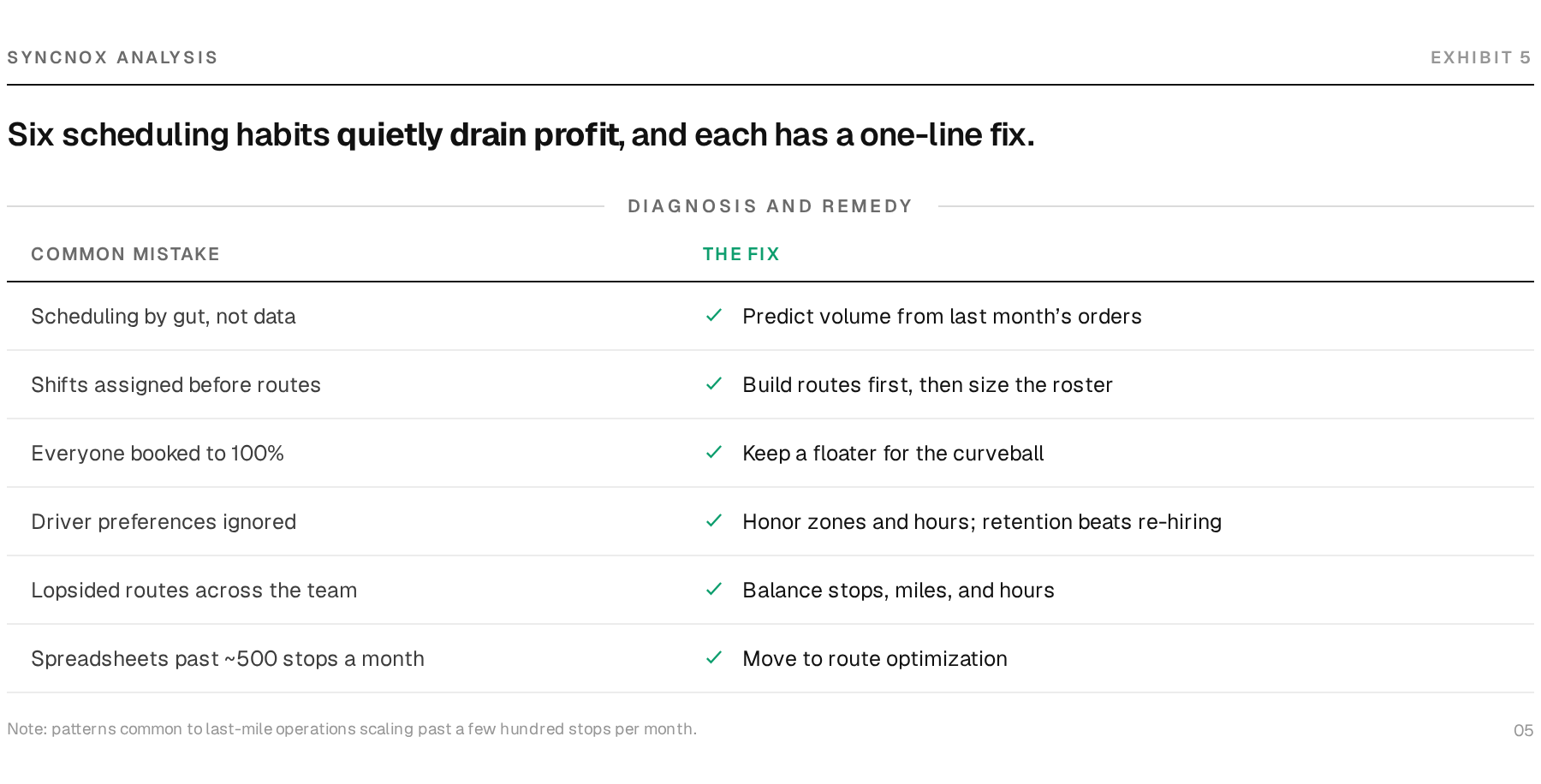
The common thread is that each mistake feels efficient in the moment and only shows its cost later, in overtime you did not plan for or a driver who quietly starts job hunting. Fix the plan, and most of those costs shrink on their own.
Everything above is doable by hand, for a while. But there is a tipping point, usually somewhere north of a few hundred stops a month, where the math outgrows the spreadsheet. Optimizing routes for 15 drivers across 300 stops with time windows and traffic is not a puzzle a human solves well at 6 a.m. It is the kind of problem a computer solves in seconds.
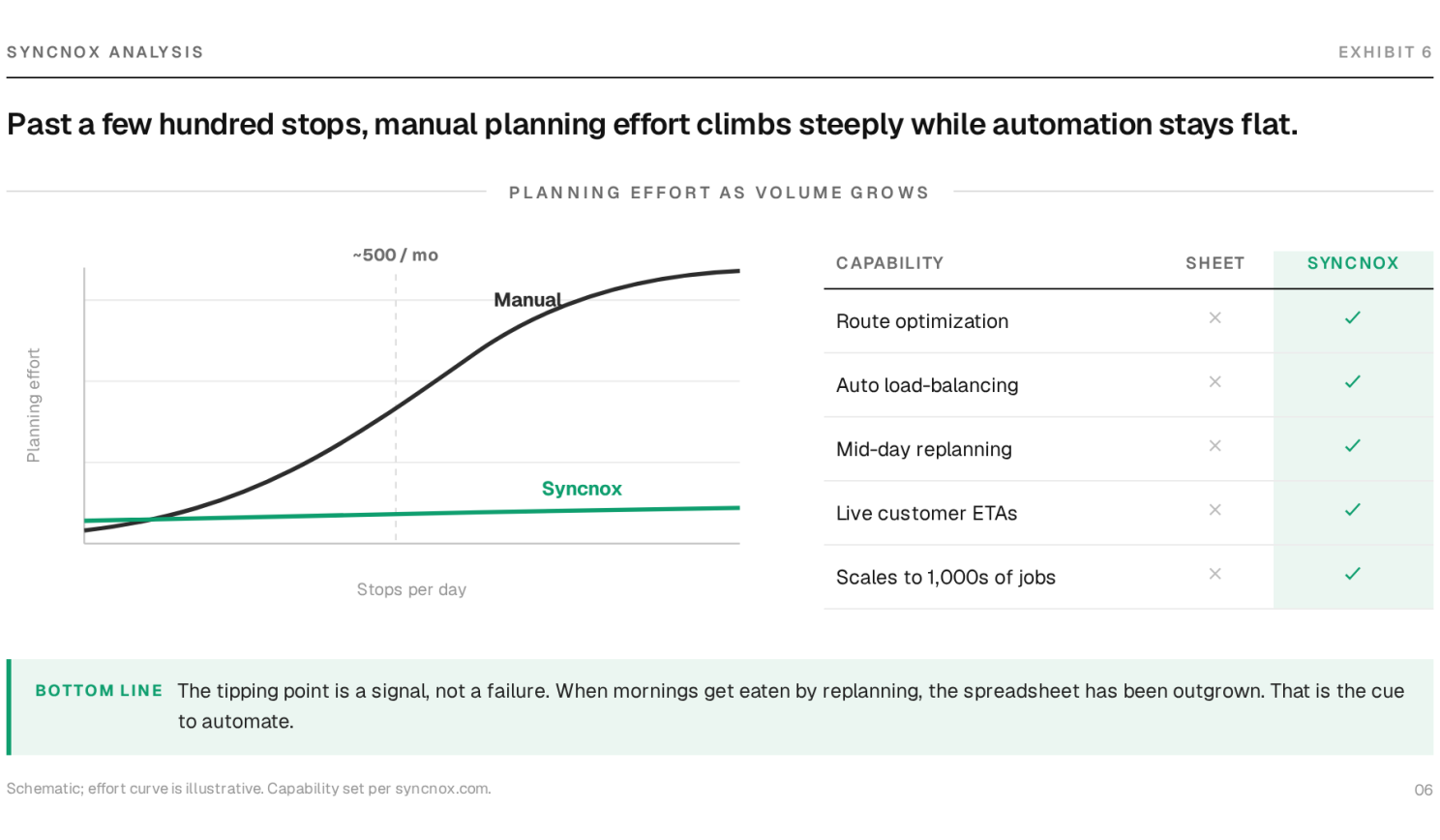
That is the gap Syncnox is built for. Instead of you hand-sorting stops and hoping, the AI engine takes your orders, constraints, and driver availability and builds balanced, efficient routes automatically. It is the route-first, load-balanced, buffer-included schedule from the steps above, minus the manual grind.
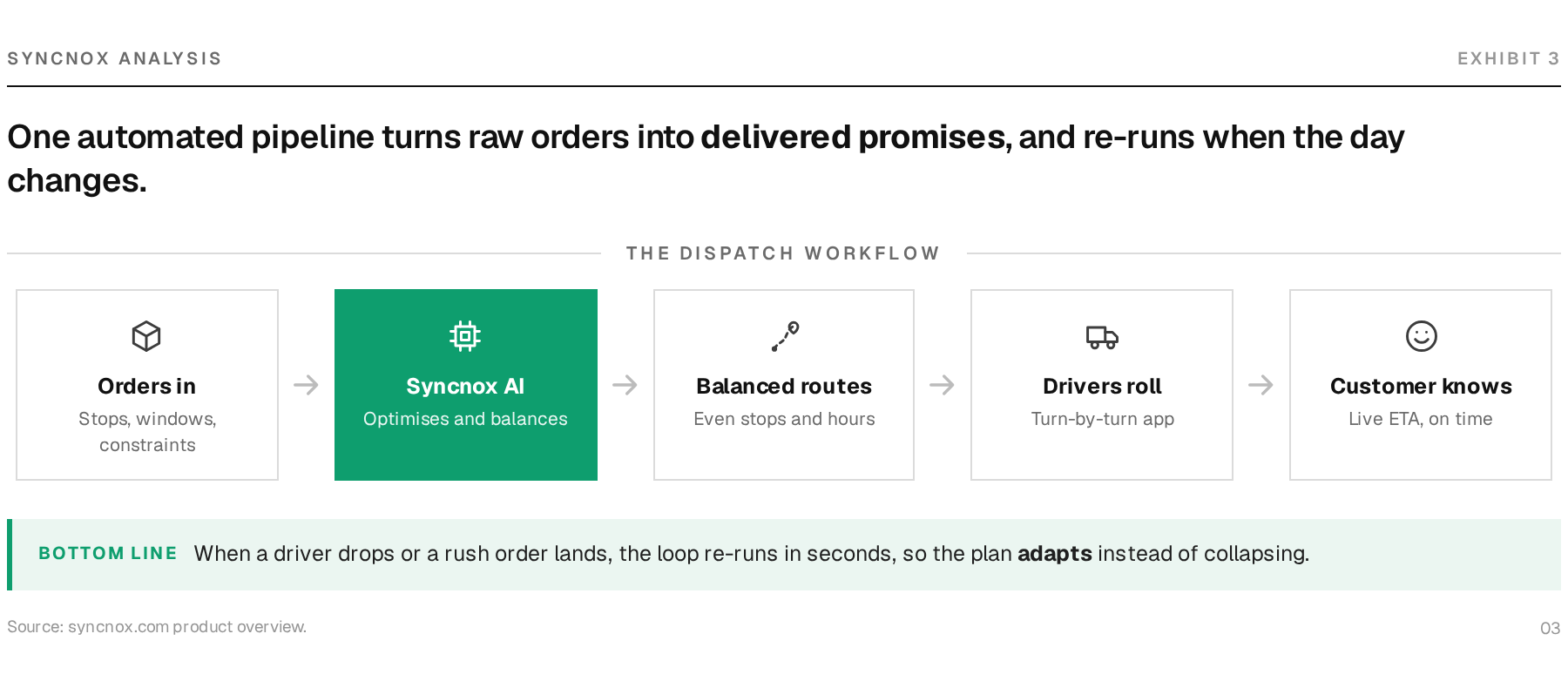
In practice, that means balanced routes by default, so you are not refereeing who got the heavy day. It means fewer failed deliveries, because smarter sequencing and accurate ETAs cut the "nobody was home" and wrong-address misses that drain profit. It means mid-day replanning that does not ruin your morning, so when a driver drops or a rush order lands, the plan adjusts instead of collapsing. And it means live ETAs your customers can see, which turns most "where's my order?" texts into a non-event.
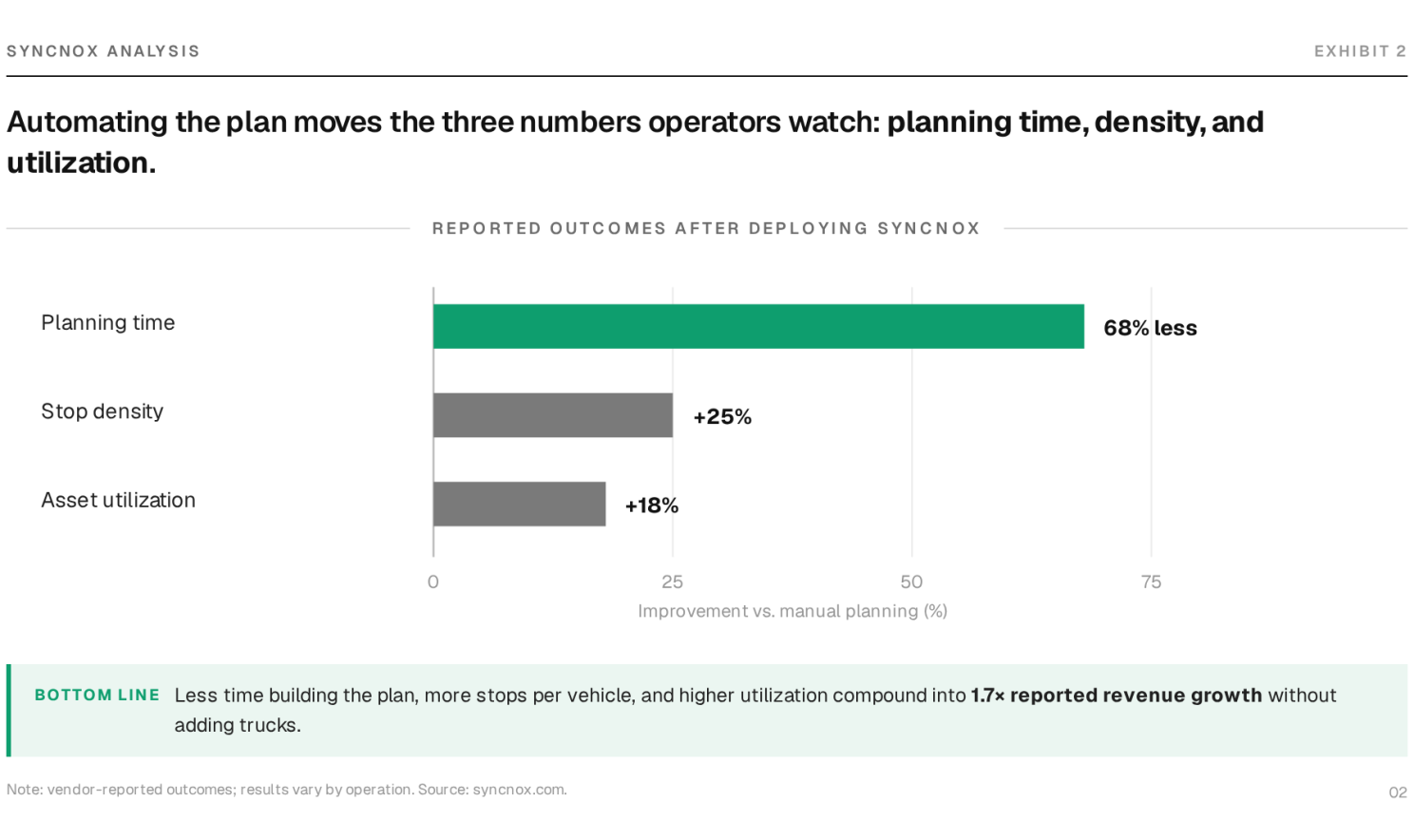
The point is not to replace your judgment. It is to hand the brute-force math to software so you can spend your attention on the things only a person can handle: the exceptions, the relationships, the calls.
How do you create a delivery driver schedule? Forecast demand, map your drivers and their constraints, build routes first, balance the load, leave buffer, communicate it early, and review it weekly. Small operations can do this in a spreadsheet. Larger ones lean on route-optimization software to do the heavy lifting.
How many stops should one driver handle per day? It depends on stop density, drive time, and how long each delivery takes. A dense urban route might be 80 to 120 stops while a rural one is 30. Do not chase a magic number. Chase balance and realistic hours, and let your own route times set the ceiling.
How do I cut overtime without overworking people? Overtime usually hides in unbalanced routes and last-minute scrambles. Balance the load, build in a buffer, and optimize routes so drivers are not backtracking across town. Fix the plan and the overtime tends to shrink on its own.
When should I switch from spreadsheets to software? When the schedule starts eating your mornings, typically past a few hundred stops a month, or the moment mid-day replans and hidden overtime become routine. If you are rebuilding the board by hand every time one thing changes, you have already outgrown the spreadsheet.
Scheduling delivery drivers well is not about being a spreadsheet wizard or working longer mornings. It is a repeatable loop: forecast, route, balance, buffer, communicate, review. Nail that, and the 6:12 a.m. panic gets a lot quieter, and your best drivers stick around to see it.
When the manual version starts to strain, that is your cue. Not to work harder, but to let Syncnox handle the math so you can get back to running the business.

_page-0001.jpg)
Problems hiding inside your field teams

_page-0001%20(1).jpg)
Learn why bad routes cost fleets $8K-$15K per driver

Weekly insights, practical strategies, and exclusive trends to help operations grow faster and lead better.
Type a question about Syncnox and send it to the AI you already trust. No form, no call, no account.
_page-0001.jpg)

See how much you can save by reducing planning time, cutting miles, lowering fuel costs, and improving route efficiency across recurring field operations.
Calculate ROI ->.svg)
Calculate the operational impact of smarter shift allocation, lower admin effort, fewer scheduling conflicts, and better workforce utilization across teams and sites.
Calculate ROI ->.svg)
Quantify the value of automating task assignment, reducing coordination delays, and improving on-time execution for high-volume operational work.
Calculate ROI ->.svg)
To connect with a product expert today, email us or call +44 07454961942.